JSON Store Columns in SCI Reports
The
JSON_STORE column is defined by the source product and is available for use in SCI reports to support various Manhattan Active® SolutionsJSON_STORE in the Data Model
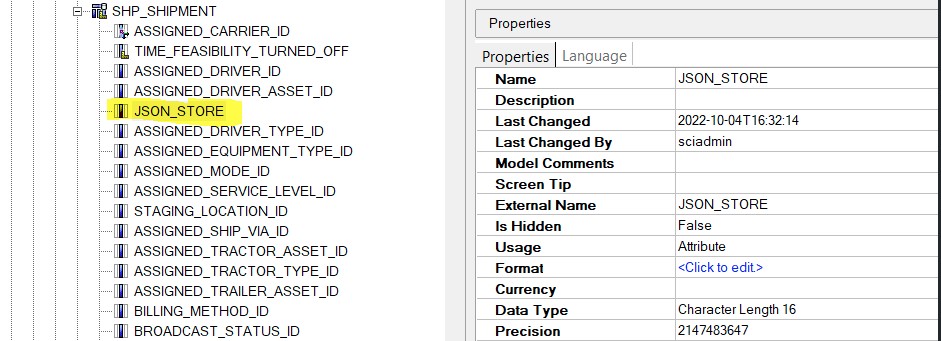
Database Layer (FM):
JSON_STOREis added to all entities where applicable.- Usage is set to Attribute.
- Data type is Character.
Business Layer:
- The
JSON_STOREcolumn is exposed in the Business Layer Query Subject across all packages.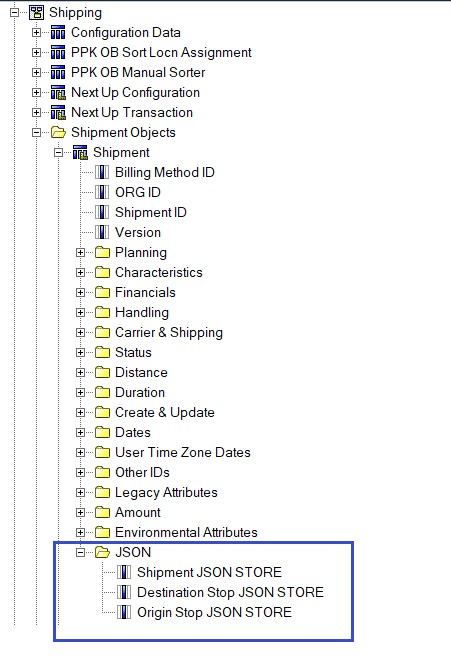
- The
Common JSON Patterns in JSON_STORE
The JSON_STORE column may store data in different structures:
A. Flat JSON
{
  "item_id": "I001",
  "description": "Widget",
  "price": 100.5,
  "available": true
}
B. Nested JSON
{
  "Fields": {
    "Description": "Handle with care",
    "extend::Hazmat": true,
    "ShortDescription": "Hazmat items",
    "extend::ExtCanceled": 2,
    "extend::OrderSpecialNote": "newborn baby"
  }
}
- Regular columns use
:. - Extended columns use
::.
C. Arrays of Objects
{
  "order_id": "O1001",
  "items": [
    { "item_id": "I001", "qty": 2 },
    { "item_id": "I002", "qty": 1 }
  ]
}
D. Arrays of JSON Rows
[
  { "Author": "User1", "Message": "Hello" },
  { "Author": "User2", "Message": "Hi" }
]
Using JSON_STORE in Reports
Step 1: Pull JSON_STORE
Include the JSON_STORE column in the query.
Step 2: Identify JSON Structure
Use a JSON formatter to validate and identify the pattern.
Examples:
- Extract extended note:
JSON_EXTRACT([Shipment JSON STORE], '$.Fields."extend::OrderSpecialNote"')
- Extract description:
JSON_EXTRACT([Shipment JSON STORE], '$.Fields."Description"')
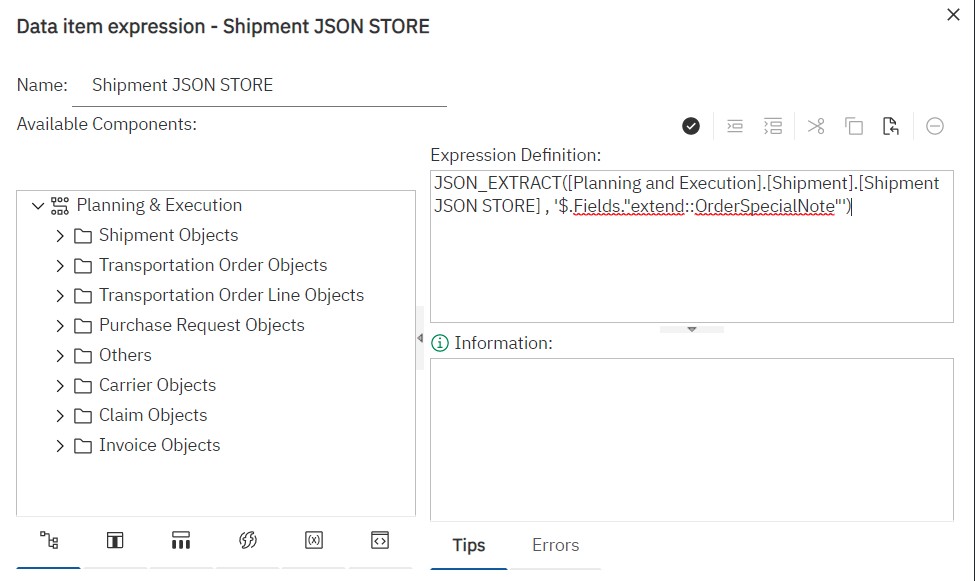
Step 3: Apply JSON_EXTRACT
Modify the query item definition using JSON_EXTRACT.
Native SQL Example
SELECT
  SHP_SHIPMENT0.SHIPMENT_ID AS Shipment_ID,
  JSON_EXTRACT(SHP_SHIPMENT0.JSON_STORE, '$.Fields."Description"') AS Shipment_JSON_STORE,
  SUM(SHP_SHIPMENT0.DECLARED_VALUE) AS Declared_Value
FROM (
  SELECT
    SHP_SHIPMENT.JSON_STORE AS JSON_STORE,
    SHP_SHIPMENT.DECLARED_VALUE AS DECLARED_VALUE,
    SHP_SHIPMENT.SHIPMENT_ID AS SHIPMENT_ID
  FROM
    default_shipment.SHP_SHIPMENT SHP_SHIPMENT
) SHP_SHIPMENT0
GROUP BY
  SHP_SHIPMENT0.SHIPMENT_ID,
  JSON_EXTRACT(SHP_SHIPMENT0.JSON_STORE, '$.Fields."Description"');
Output

Extraction Examples
- Nested JSON (MaxChatCapacity):
JSON_EXTRACT(ColumnName, '$.EntityLabels.Annotations.MaxChatCapacity')
- Array of Objects:
JSON_EXTRACT(order_json, '$.order_id') AS order_id,
JSON_EXTRACT(value, '$.item_id') AS item_id,
JSON_EXTRACT(value, '$.qty') AS qty
- Array of JSON Rows:

JSON_EXTRACT(EngageChatConversation, '$[*].Author')      -- All Authors
JSON_EXTRACT(EngageChatConversation, '$[0].Author')     -- First Author
⚠ Limitation: Arrays of JSON rows cannot be directly combined with other columns in Cognos. Prefer using flat JSON or JSON with distinct fields.
Performance Considerations
- Query Complexity: Extracting nested fields requires
JSON_VALUE,OPENJSON, or JSONB operators. - Indexing Limitations: Limited or complex indexing on JSON compared to flat columns.
- Slower Reads: Runtime JSON parsing increases CPU usage.
- Maintenance Overhead: Complex JSON structures are harder to validate and debug.
Best Practices
- Flatten JSON in staging tables before reporting.
- Extract frequently used fields into physical columns.
- Use indexed computed columns (SQL Server) or generated columns (MySQL/PostgreSQL) for key paths.
- Avoid deeply nested arrays in high-volume systems.
- Monitor query performance when applying JSON functions in
SELECTorWHERE.
Last modified March 17, 2026: Patching content from dev to stage for 2026-03-20 release (e93eeb4)
Feedback
Was this page helpful?